Using the mods
Everything you need to build the update, put it on your CDJ-900NXS and use each mod. The player must run the official firmware 1.31; the builder only accepts that update.
Install
- Get the official
C900NXS.UPDfor firmware 1.31 from Pioneer DJ. - Open the builder and choose the file. It checks its SHA-256 and refuses any other file.
- Tick the mods. Ticking a mod also ticks what it needs (
hotcuekeysneedscuecolours); unticking one unticks what needs it. - Confirm the two points (no liability, code written with Claude Code) and build. Everything happens in your browser: nothing is uploaded, nothing is downloaded.
- Download
C900NXS.UPD, copy it to the root of a FAT32 USB stick and run the update from the player as you would for an official update.
Command line
The Python patcher builds exactly the same file, byte for byte. Tick the mods with the arrow keys and Space, build with Enter, accept the disclaimer by typing yes:
Or name the mods and accept with --accept:
Back to stock
Build with no mod ticked in the builder (or --stock with the patcher): the original application, relabelled so the player accepts it. Update as above. Keep this file on a stick before you try any mod.
advanced_waveforms experimental
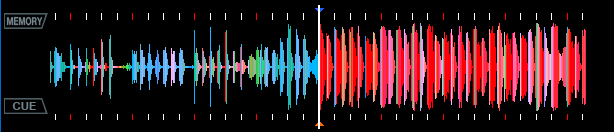
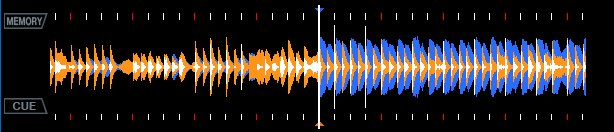
The big waveform in RGB colours from the track's colour waveform data, and the overview's colour table as a red-to-white gradient. Called rgb_waveform before site 1.2.0; the patcher still takes that name. 1.0.1: rekordbox's colour data is used also when it is a few columns shorter than the waveform, which is common; such tracks showed the plain gradient colours before. UTILITY › WAVEFORM: BLUE / RGB (default) / 3BAND; 3BAND draws rekordbox's 3-band data (lows blue, mids amber, highs white), the overview too.
extended_bpm
The BPM to two decimals: the tenths as a small digit above, the hundredths in the place of the stock decimal.
phasemeter experimental
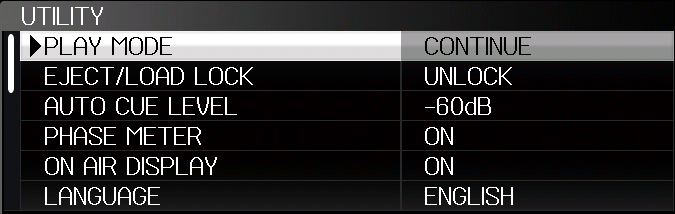
A two-line phase meter instead of the four boxes: orange for the master, blue for this deck, each with a marker. UTILITY › SLIP FLASHING becomes PHASE METER: ON shows the lines, OFF the stock boxes. The orange marker needs another player as tempo master. PHASE METER also has a third value, REVERSE (the markers run right to left), and the bar countdown right of the meter sits a few pixels further right, clear of the lines.
cuecolours
When a track is loaded the player asks its database for the cues. This mod also asks for the extended cue list (the one newer players read from rekordbox's export), which carries the colours and the hot cues.
- Memory cues are drawn in the colour set in rekordbox, on the overview and on the big waveform. A memory cue without a colour, or one stored on the player, stays red.
- Hot cues A–H are drawn as small boxes with their letter, in their rekordbox colour.

hotcuekeys experimental
The CDJ-900NXS has no hot cue pads. This mod lends it three: the top three BEAT DIVIDE keys left of the jog. It needs cuecolours, which reads the hot cues from your USB.
The hot key mode
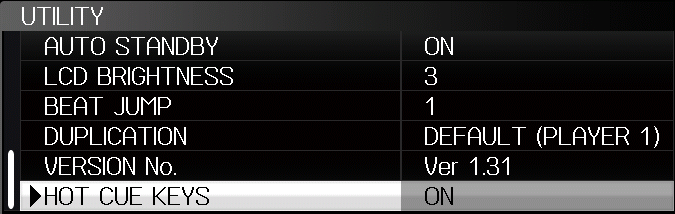
- Open UTILITY (hold MENU) and set HOT CUE KEYS to ON. The player remembers it.
- Press QUANTIZE briefly: the hot key mode switches on, and a red HOT KEYS box appears beside the QUANTIZE label. Press briefly again to switch it off (the box turns grey).
- Hold QUANTIZE for about a second to switch quantize as usual.

In the mode the BEAT DIVIDE keys are hot cues, top to bottom:
1/4 and 1/8 do nothing in the mode and stay dark: the player has three hot cue buffers, and A–C keep them. With the mode off, or HOT CUE KEYS set to OFF, the keys do what they always did.
Loading
After a track is loaded and the deck stands at its CUE point, hot cues A, B and C are buffered one after another, about a second each, like the CDJ-2000NXS does. Meanwhile:
- the big waveform stays black and appears once all are ready;
- PLAY, CUE and the hot cue keys are locked, so nothing interrupts the loading;
- the key of the hot cue being loaded blinks;
- nothing is heard: the output stays silent until the deck stands at its CUE point again.
Then the deck stands at its CUE point again, as before, and each of the three starts at once. This happens whether the hot key mode is on or not, as long as HOT CUE KEYS is ON.
Play a hot cue
Press the key briefly. The deck jumps to the hot cue and plays — also from a pause, in CDJ and in VINYL mode.
Gate
Press the key and keep holding it. The deck jumps and starts playing at once, exactly as with a short press. When you let go:
- held less than 0.5 s: it simply plays on (a normal hot cue);
- held 0.5 s or longer: it jumps back to the hot cue and stands there, ready to go again.
From 0.5 s on the key blinks slowly while you hold it, so you can see the gate is armed.
Set a hot cue
On a key without a hot cue (LED off):
- Pause the deck at the place you want.
- Hold the key for 0.8 s. The hot cue is set there — A in green, B in orange, C in blue — its LED blinks twice and then stays dim, and the box appears on the waveforms.
- It is buffered at once, so it starts instantly from the first press. The deck then stands at the new hot cue; PLAY plays from there.
Keys that already have a hot cue are not overwritten — delete the old one first.
Delete a hot cue
- Hold DELETE (beside MEMORY under the screen).
- While holding it, press the hot cue key. Its LED blinks twice and goes off, and the box disappears from the waveforms. You can delete several keys while holding DELETE.
- Let go of DELETE.
The LEDs
In the hot key mode the LEDs of 3/4, 1/3 and 1/2 show hot cues A–C; 1/4 and 1/8 are off (SLIP no longer changes them):
Good to know
- Set and deleted hot cues are saved on the USB stick, in the track's rekordbox analysis files with their colours, the same way MEMORY and DELETE keep memory cues; the player shows MEMORY for each. Like MEMORY, this works once the track has settled. Let the last one finish before you load the next track.
- A hot cue played from a buffer leaves the CUE point where it is. A gate's release stands at the hot cue; PLAY then plays from there.
- Hot cues D–H from rekordbox are shown on the waveforms but have no key.
- No slip hot cues yet: with SLIP on, a hot cue plays as without SLIP.
beatjump experimental
The TRACK SEARCH keys ◀◀ / ▶▶ jump along the track's beat grid instead of changing the track. How far is chosen in UTILITY › BEAT JUMP (where SCREEN SAVER was): OFF, 1, 2, 4 or 8 beats; 4 until you choose, and your choice stays when the player is switched off.
- The jump is exactly that many grid beats, so with 4 or 8 the phase meter shows the same place in the bar after the jump; with 1 or 2 the beats still line up, the bar moves on by one or two beats.
- Playing, it is made at once in the audio the player has already decoded: no gap, no pre-roll. Paused or at the cue it moves the deck there; PLAY plays on from it.
- The player always keeps 10 s of decoded audio ahead; a press that would leave less (very fast clicks with 8 beats) is ignored and the next one counts again. Nothing is put off, so the player never runs dry (no EMERGENCY LOOP).
- It needs
hotcuekeys(its engine makes the jumps) andcuecolours; the builder ticks them for you.
ledsaver
UTILITY › LED ANIMATION (the last item) is ON from the first start; set it to OFF to switch it off (the player keeps the choice). When the player's own screen saver dims the display (5 minutes without a track loaded, or 100 minutes paused or at the cue), the LEDs play a loop of about four and a half seconds:
- the BEAT DIVIDE keys fade in a wave from top to bottom and back up,
- SYNC and MASTER, MASTER TEMPO and DISC EJECT fade in and out against each other,
- CUE, PLAY, REV, SLIP, the SLIP LOOP bar and RELOOP/EXIT light one after another,
- the jog's three rings light in turn: inner, middle, outer, middle, inner …
Any key ends it, as it ends the screen saver.
keynotation experimental
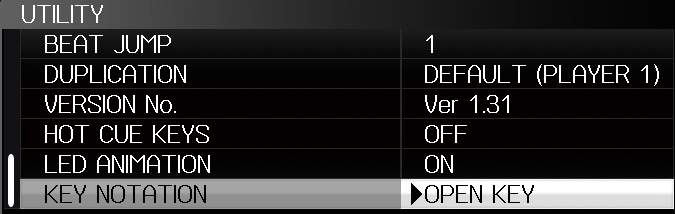
rekordbox writes each track's key as text, in whatever notation was set in its preferences when the stick was exported: 4A, 9m or Fm for the same key. This mod shows every key in one notation of your choice, UTILITY › KEY NOTATION (the last item):
- CAMELOT (default) — 1A–12A minor, 1B–12B major, as on the Camelot wheel;
- OPEN KEY — 1m–12m minor, 1d–12d major (8A = 1m = Am);
- CLASSIC — Am, F#m, Db … as rekordbox writes them;
- OFF — the key as exported.
The player converts with a table of all spellings, sharps and flats included (G#m, D#m, A#, Gbm …). It works on the main screen, in INFO and in BROWSE › KEY (the key list and its compatible-key groups such as “1A, 1B, 12A, 2A”); a new choice shows from the next track loaded.
Each key is drawn in the colour of its place on the Camelot wheel (8A pink, 5A orange, 4A yellow …), in all three notations; with OFF it stays white. A highlighted row keeps its black text, and the letters you type in SEARCH are left as they are. The player's text colour is set per text box, so the mod sets it for a key's box just before the player draws it.

credit
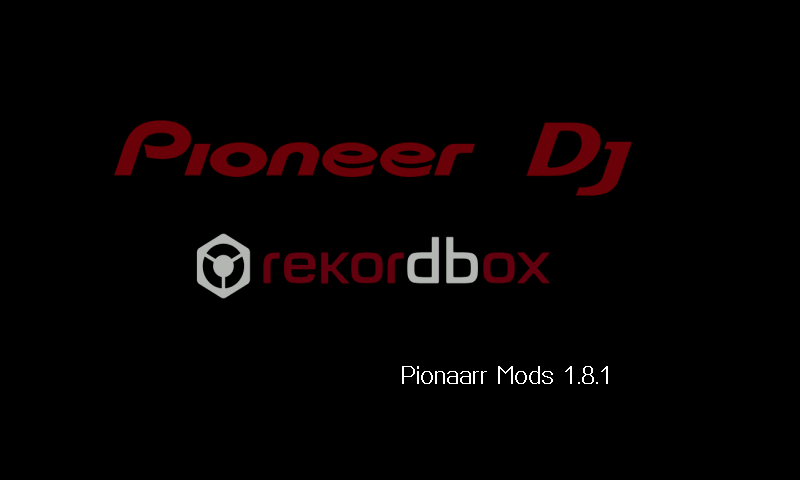
The boot screen says Pionaarr Mods 1.9.1 where it said Ver 1.31. Ticked at the start; untick it to keep the stock text. UTILITY and the LINK screen still show the real version, 1.31.
cuenames experimental
The comment a memory cue or hot cue has in rekordbox (the cue list's comment field, exported with the stick) appears in the title bar, right of the title, in the cue's colour: always the next cue ahead that has one, a hot cue with its letter ("A DROP"). A cue just passed shows for a second more, so a cue you CALL shows its name while you stand on it. Hidden while BROWSE is open; a long title is cut short before the name. Needs cuecolours.

played experimental
In BROWSE, every track loaded on this player since it was switched on is shown in green, as the player shows its loaded track. Over Pro DJ Link, modded players share what they load: a track played on another modded deck turns green here too and stays green. A track loaded on another deck right now has that deck's number in front, [1]; on several decks, all of them ([1][3]). Players without the mod are not marked. Tracks are matched by title.
For this, a modded player adds a small tag to its Pro DJ Link status packet (in bytes the 900NXS always leaves zero): "PM" and a hash of the loaded title.
![Track list with [1] Lunatica in green](assets/played.png)
endwarn experimental
In a track's last 30 seconds the playing-address bar under the overview, which the player makes blink there anyway, blinks red instead of white.

quicksearch experimental
BROWSE held opens SEARCH straight away, from wherever you are; the next plain BROWSE goes back to the folder you were in. BROWSE pressed twice goes to the list the playing track was loaded from, with the track picked. Since 0.4 it tells the player's browser directly which list and row to show instead of pressing keys for you: SEARCH in about a second, the track's list in about two.
usbautoload experimental
When the player finds MY SETTINGS on a stick, they are loaded at once, without waiting for MENU. UTILITY › USB AUTO LOAD switches it.
wide_waveform experimental
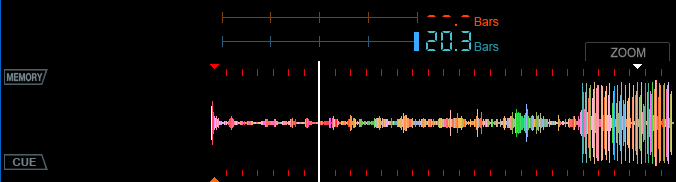
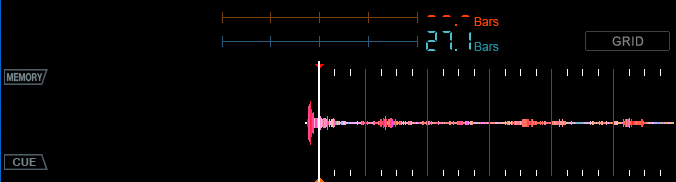
The big waveform runs on to the right edge of the display, where the ZOOM/GRID wheel was: 624 columns instead of 536. The playing position stays where it was, so the extra columns show what is coming. The wheel is gone; a small grey box above the waveform, over the BPM display, says what the rotary selector does now: ZOOM or GRID (held, as before, it switches). Beat grid, cue markers and loops are drawn over the whole width. Goes with every waveform mode of advanced_waveforms and with the stock blue one.
Still to come: see Upcoming.
Status
| Mod | By | Status | Player |
|---|---|---|---|
advanced_waveforms | Pionaarr mod | experimental | ran on a player |
extended_bpm | arnoldasr | stable | ran on a player |
phasemeter | arnoldasr | experimental | ran on a player |
cuecolours | Pionaarr mod | stable | ran on a player |
hotcuekeys | Pionaarr mod | experimental | ran on a player |
beatjump | Pionaarr mod | experimental | ran on a player |
ledsaver | Pionaarr mod | stable | ran on a player |
keynotation | Pionaarr mod | experimental | emulator only |
credit | Pionaarr mod | stable | ran on a player |
cuenames | Pionaarr mod | experimental | ran on a player |
played | Pionaarr mod | experimental | ran on a player |
endwarn | Pionaarr mod | experimental | ran on a player |
wide_waveform | Pionaarr mod | experimental | emulator only |
quicksearch | Pionaarr mod | experimental | ran on a player |
usbautoload | Pionaarr mod | experimental | ran on a player |
FAQ
Does this touch the boot loader?
No. The builder copies the boot loader and recovery loader from the official file byte for byte and checks them again before you can download it. Only the main application changes.
Is my firmware uploaded anywhere?
No. The builder runs entirely in your browser; everything it needs comes with the page.
Can I go back?
Yes, build with no mod ticked (or --stock) and run the update. Keep that file ready before flashing mods.
Do I need rekordbox?
Cue colours and hot cues come from a USB stick exported with rekordbox. Without them the mods show what the stock player shows.
Why is the version still 1.31?
The update file says 1.32 so the player installs it; the application inside still reports 1.31 (in UTILITY and on the LINK screen). Only the boot screen says Pionaarr Mods 1.9.1 instead of Ver 1.31.